HTML Block and Inline Elements
Every HTML element has a default display value, depending on what type of element it is.
The two most common display values are block and inline.
Block-level Elements
A block-level element always starts on a new line, and the browsers automatically add some space (a margin) before and after the element.
A block-level element always takes up the full width available (stretches out to the left and right as far as it can).
Two commonly used block elements are: <p> and <div>.
The <p> element defines a paragraph in an HTML document.
The <div> element defines a division or a section in an HTML document.
The <p> element is a block-level element.
The <div> element is a block-level element.
Example
<p>Hello World</p>
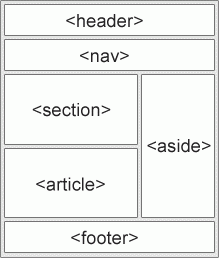
<div>Hello World</div>Here are the block-level elements in HTML:
Inline Elements
An inline element does not start on a new line.
An inline element only takes up as much width as necessary.
This is a <span> element inside a paragraph.
Example
<span>Hello World</span>

Leave a comment
Your email address will not be published. Required fields are marked *