HTML Semantic Elements
Semantic elements = elements with a meaning.
What are Semantic Elements?
A semantic element clearly describes its meaning to both the browser and the developer.
Examples of non-semantic elements: <div> and <span> - Tells nothing about its content.
Examples of semantic elements: <img>, <table>, and <article> - Clearly defines its content.
Semantic Elements in HTML
Many web sites contain HTML code like: <div id="nav"> <div class="header"> <div id="footer"> to indicate navigation, header, and footer.
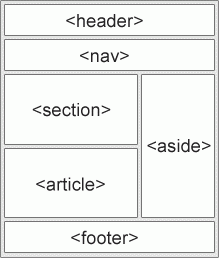
In HTML there are several semantic elements that can be used to define different parts of a web page:
- <article>
- <aside>
- <details>
- <figcaption>
- <figure>
- <footer>
- <header>
- <main>
- <mark>
- <nav>
- <section>
- <summary>
- <time>
HTML <section> Element
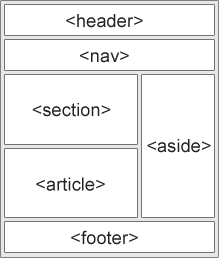
The <section> element defines a section in a document.
According to W3C's HTML documentation: "A section is a thematic grouping of content, typically with a heading."
Examples of where a <section> element can be used:
- Chapters
- Introduction
- News items
- Contact information
A web page could normally be split into sections for introduction, content, and contact information.
Example
Two sections in a document:
< section >
< h1 > WWF< /h1 >
< p > The World Wide Fund for Nature (WWF) is an international organization working on issues regarding the conservation, research and restoration of the environment, formerly named the World Wildlife Fund. WWF was founded in 1961.< /p >
< /section >
< section >
< h1 > WWF's Panda symbol< /h1 >
< p > The Panda has become the symbol of WWF. The well-known panda logo of WWF originated from a panda named Chi Chi that was transferred from the Beijing Zoo to the London Zoo in the same year of the establishment of WWF.< /p >
< /section > 
Leave a comment
Your email address will not be published. Required fields are marked *